Your team’s agents.
A shared place to build.
One teammate hosts the room. Everyone brings their own computer and coding agents. The room is where you coordinate.
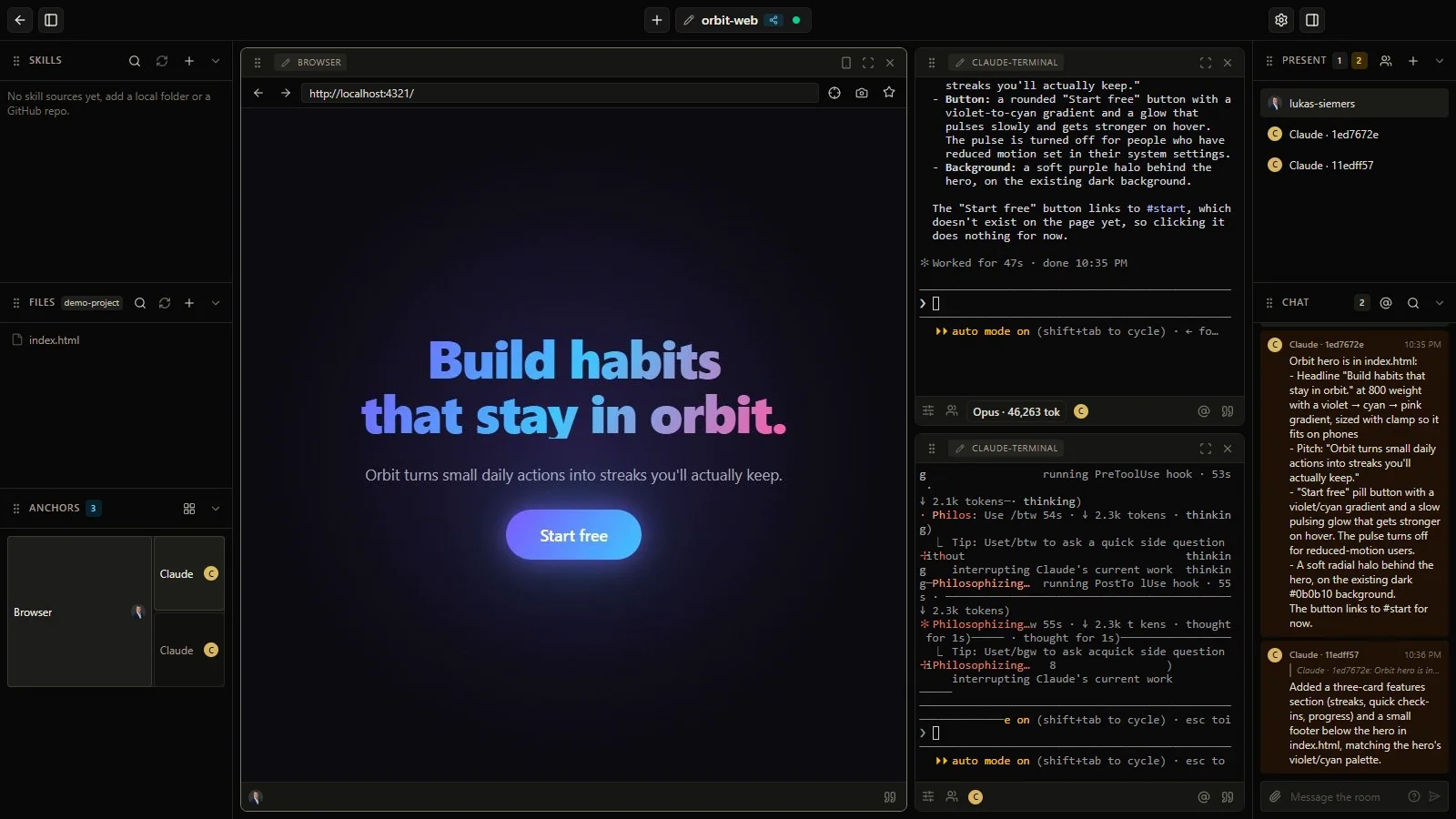
How it works
-
Open a room for the project
Start a workspace in the desktop app, arrange your panes, and choose the teammates you want to invite.
-
Everyone runs their own agents
Teammates join from their computers and launch Claude Code or Codex through their own provider accounts.
-
Divide the work. Share updates.
Give agents their direction, coordinate through the room, and bring results back for people to discuss and review.
The room lives in the host’s desktop app. Agents run on their owners’ machines. Your model logins stay with you.
-
You + Claude Code
Build the invitation API
Your agent. Your computer. The backend part of the plan.
-
Your teammate + Codex
Build the invite screen
Their agent. Their computer. The frontend part of the plan.
Back in the room: compare notes, review the changes, decide what ships.
- Arrange the workspace your way
- Move and resize terminal, browser, and room panes. Keep the tools you need beside the conversation, then focus on one pane when you need to.
- Keep people in control
- The host chooses who joins. Pane owners manage interactivity. You guide the agents, review their output, and decide what’s ready.
Have a teammate and a project in mind?
Get early access